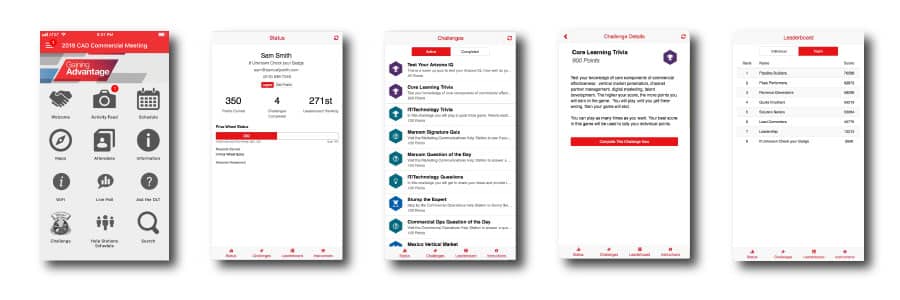
For many B2B corporate events, team building is Job #1.
Your management wants their meeting attendees to transform from a group of strangers and acquaintances into a unified team aligned with your company culture and strategy.
Because after the meeting’s over, they’ll be much more willing to help their new friends than their unknown coworkers. Plus they’ll be less likely to leave, reducing turnover and increasing productivity, sales, and profits.
To help you achieve your team building event objective, we’ve assembled 60 team building activity ideas you can build into a digital game your attendees can play on their smartphones throughout your event.
Many of these ideas have been used by actual SocialPoint customers in the games we created for their corporate events, while others are further ideas tailored to key use case games we can design for your attendees with our game platform.
Your Event App + SocialPoint = Improved Attendee Engagement
Recently, I downloaded the Event App Bible from the thought leaders at the Event Manager Blog. (Get it here)
While we don’t make Event Apps, we always like to see what the more than 120 event app providers are doing — or not doing. This year, we were excited to see Attendee Engagement and Interactivity (top trend), Gamification (#4 trend) and Interactive Q&A (#10 trend) all rank so high on the chart. Further, we were surprised to see that many of the Event Apps reviewed by the Event Manager Blog are missing capabilities that we offer.
It got us thinking.
We should compare ourselves to event apps so you can see how these two technologies work together to improve attendee engagement.
How Does SocialPoint Compare to Event Apps?
At SocialPoint, our strength is helping deliver dependable, on-brand, custom-looking interactive trade show games and event gamification quickly.
Event Apps, on the other hand, are your online event guide and a single point of contact for event communication.
How do you integrate SocialPoint’s audience engagement games into an Event App?
Let’s use CVENT’s Crowd Compass as an example. In Crowd Compass, you can set up an icon with a link to our web-based app. When attendees click on the icon image, it opens our game as an internal web browser link inside the event app. When the player is ready to return to the event app, they click the back button to exit the game and return to the main menu.
It’s a simple way to add gamification to enhance the attendee experience at corporate meetings and conferences.
What are some of the ways that SocialPoint improves the attendee experience?
1. Manage Live Polls, Interactive Q&A, Word Clouds & Brainstorming
Our app allows you to set up a “show flow” of different types of questions that can be pushed to the attendees (by room) when it is appropriate.
2. Trivia Games and Quizzes with Leaderboards
If you want to turn up the engagement, then use our three strikes trivia game. A popular strategy is to activate trivia during breaks and put the leaderboard on the big screen during walk-in and walk-out. Attendees will go wild. You will quickly get more than 10,000 trivia questions answered in a one-day event.
3. Spin to Win Prize Wheel
Use this as a name picker or a prize picker – either approach will generate excitement in your event. Why SocialPoint? Branded, inventory management, and looks fantastic on the big screen.
4. Attendee Participation Game (APG)
It may look like word soup, but the APG is a content-based event gamification product. The APG ties together the best of what SocialPoint has to offer, so you can script out content-based games aligned to your event’s objectives. Which other vendor allows you to build games that include trivia, kiosks, prize wheels, and leaderboards?
What is the feature-by-feature comparison of apps in the Event App Bible and SocialPoint?
This table compares the audience engagement features in the Event App Bible with the features that you can find in SocialPoint. (Get the Event App Bible to see how your event app vendor compares.)
When it comes to audience participation games, these are some of the questions that our potential clients bring to us in our first meetings. Ultimately, they are searching for the best game for their needs:
What are some simple and fun, games for audience participation?
How can you create audience participation games that are relevant to your content?
How can you create audience participation games that keep attendees engaged over multiple days of your corporate event?
If you are a speaker (or facilitator) trying to spice up your session, how can you implement these games yourself?
How can I use the data collected to make better business decisions?
To help you with your brainstorming, we pulled together a list of audience participation games and provided a short explanation of how they could work inside your event. Use this list as one input for your own sales meetings, customer events, and conferences. We grouped the games into three different game families:
One of the challenges of corporate events is to break out of the cycle of sameness. A series of speeches, presentations, panel discussions and an uninspired trade show can have a hypnotic effect on attendees.
So why not shake things up a little and create some fun, energetic activity with a Virtual Prize Wheel? Here are 5 ways to use a Virtual Prize Wheel for audience engagement at corporate events:
1. Create a Name Wheel for Your Prize Drawing
Instead of drawing a name out of a hat and announcing the winner on stage, use a Spin to Win Virtual Prize wheel to take things to a howl new level. Instead of putting prizes on the prize wheel, put drawing entrants on it. Then, as the wheel spins the crowd excitedly watches to see whose name pops up – is it their name, or one of their friends? Finally, as the wheel gets close to stopping it slows down increasing the tension and excitement.
“I want 100% of the attendees to participate in this activity!”
It’s a phrase that I hear from meeting planners all the time. They are convinced that the attendee engagement experiences won’t work if only 60% of the people do it.
How many presentations have you attended that could have been delivered more effectively as an email?
You know the drill.
The speaker unleashes a tidal wave of PowerPoint slides with graphs and charts going every which way. It’s hard to pay attention. They rarely ask questions or solicit feedback to involve the audience. To add insult to injury many speakers will read the slides.
That’s bad. Really bad. Because the world has changed, and so have your audiences.
Not including time for audience engagement in your events and presentations might have worked in the past, but today’s audiences have higher expectations of being involved with learning and interacting. So, you need to make the time! Just consider how audiences have become more hands-on in reaction to major recent changes:
20 years ago – Internet searches and YouTube videos:
About 20 years ago Amazon.com was created, kind of when the Internet got really popular. Today, when my friends or my brother and I have an argument about who’s the best sports athlete we don’t just guess – we Google search it to see who is right. And, we Google it on our smart phones. You probably do that, too. And when I need to fix the dishwasher, rather than call a plumber, I go on YouTube to find videos. You probably do that, too, and so do your audiences. Do-it-yourself videos have changed your attendees’ behavior.
10 years ago – Mobile/Socialenables content creation, sharing, collaboration and critiquing:
When the iPhone came out about 10 years ago that really started a social mobile revolution. Now, where I live in Minneapolis Minnesota, over 85% of the people have smartphones! That means 85% of the people are content creators, because the phone in their pocket is a tool for creating content and sharing that content. They don’t need anything else. They have the tools and experience to create content and share or critique it or collaborate with others about it.
Today – More people with advanced education:
In the United States there are more college and master’s degrees per person than ever before. In the last 20 years the number of U.S. master’s degrees has more than doubled. And the number of college degrees per capita went up over 40 percent. The number of secondary degrees is the highest ever. That means your audience is more educated, so you’ve got smart people in the room. With Audience Response Systems (ARS) you have a way to Google them and get them involved in what you’re trying to do, rather than force them to just sit and listen.
If you think that you don’t have time in your program, you better make time! Because your audiences have the tools to figure out what the answers are to their problems and go solve them. You’re better off using that audience collectively, engaging them to create something greater, instead of just having a speaker and leaving all that brainpower and willingness left fallow.
So, you don’t have to be the person who drowns your audience under waves of PowerPoint slides. Instead, follow the suggestions below to get your audience involved and help them pay attention to you!
1. Schedule audience participation into your presentation
Yes, you need to plan audience interaction in your presentation. I would recommend 10-20 minutes.
Why? Because attendees stop paying attention after 10 minutes AND your presentation is probably the third one of the day. They can only take so many graphs and charts.
If you can get them to consider rhetorical questions, participate in small group conversations or ask you questions, then you will win.
2. Help people participate during your presentation
For audience interaction – speakers should inspire the audience to act.
When we looked at the reasons people attend conferences words like Try, Share, Meet and Discuss bubbled up to the top.
Along those same lines the key audience participation words are ask, answer, poll, rank, vote, play, capture, collect, discuss, display, share. Notice: “sit and listen” are not on the list.
These are the actions that you can inspire your audience to take.
3. Think about attendee engagement as “Googling the audience”
A feedback loop is a way to take all of the small engagement conversations and bring them back to you the speaker. This might be through live polling results, conversation recaps, Q&A, word cloud or some other technique.
For example, sometimes speakers ask the audience to discuss a ___________ that ____________ (example: discuss a leader that inspires you). Then, attendees form groups of 2-3 and talk for a few minutes. Where does that conversation go afterward? Is the information fed back to the audience? Or do they keep it themselves? Savvy presenters will ask someone to share these conversations.
5. Consider Live Polling, Interactive Q&A or Interactive Trivia
If you have a large audience, then Live Polls, Interactive Q&A or Interactive Trivia would be a great way to get people involved with you.
If your event is not providing an event app, then you may consider an audience response app to scale up your audience participation and attendee engagement. There are several options available and most have a basic interactive Q&A and Live Polling feature. Solutions like SocialPoint include the Interactive Trivia.
Also, these audience response apps have live results displays so you can create a feedback loop. Yeah!
If you don’t know how to use the technology read this guide: How to Prepare Your Speakers to Use Audience Response Apps.
The Big Finish
Don’t let your next presentation be a tidal wave of PowerPoint slides. Incorporate 10-20 minutes of audience participation activities into the presentation. We promise that you will see the results in your post-event feedback forms.
Have an awesome next event!
If you need game ideas to increase audience and attendee engagement in your events and trade show booths try our game selector tool below. It will help you generate more fun, excitement, and results.
The greatest advantage of event apps and audience response apps is to give your attendees a voice.
Instead of passing around microphones in a large audience of 1,000 attendees, an event app or audience response app can be used to capture hundreds of questions instantly from curious attendees.
Equally important – activities such as brainstorming can be scaled up to hundreds and thousands of participants with the same rich participation that you get from groups of 8 to 10 people. While these technologies are loaded with capabilities – it’s very likely that most of these technologies will be new to your speakers. This post provides a guide to help you prepare your presenters to use these tools in their presentations and workshops.
Four years ago, CompTIA contacted Interactive Meeting Technology/SocialPoint to help them deliver their first online event. The goal was to deliver an online, educational event to at least 100 attendees and have them remain online for at least two sessions.
CompTIA had nearly 1,000 registrants and over 300 attendees that first year. Four years later, their attendee numbers have skyrocketed to well over 4,000.
This is how we did it, through a strong collaboration between us, the vendor, and an engaged and motivated client team.
Using event technology to poll attendees is only the beginning of what you can do to create more attendee engagement.
Event technology, event apps and audience response apps offer several new and improved ways to create conversations with your audience.
Here are some of the things you can do: poll, play, create, capture, share, vote, survey, comment and smile. Yes, smile, because you can share photos too.
With all of these capabilities at your disposal, here are 20 ways you can use event technology to create attendee engagement experiences
At their best, events are an explosion of content and ideas where we craft meaningful stories and create community.
However, events are also where we too often load everybody up with as much coffee as we can give them and then send them into a big, dark room with rows and rows of chairs to watch the CEO’s presentation up on a big screen!
Most attendees stop paying attention after 10 minutes
As an event professional, you probably know that most attendees stop paying attention after 10 minutes! We polled event professionals at a recent webinar, and 85% of the participants knew that attendees lose their attention after just 10 minutes. And yet, so many meetings don’t seem to take that key fact into account when creating their conference content and agenda. (Read 20 reasons people attend conferences)